
![[personal profile]](https://www.dreamwidth.org/img/silk/identity/user.png)


(no subject)
I'm cooking a turkey because Christmas is all about bread stuffing and cranberry sauce where I come from, and I thought it was a small turkey- 9 lbs or so- but my roasting pan is equally as small so to baste it I have to lift it out bodily and put it in another pan and scoop up the juice with my spoon and then put the turkey back (and thank god I found a proper turkey lifter finally) and then return the pan to the oven.
And it occurred to me, here I am a gay woman who is all about the babies and I don't have a turkey baster of my own. Fail, fail, fail.
But even though I fail I have scored mightily in the gift department. To save sensibilities I won't list 'n' gloat, but I *will* share what's sharable. So: behold Hisui the gold dragon, Goukou's Chancellor and heart-throb of whatever court he finds himself in, from the talented pen of![[livejournal.com profile]](https://www.dreamwidth.org/img/external/lj-userinfo.gif) rasetsunyo. Linked from my archive because lj's gallery function reduces the size to something like half and you can't see it in proper detail.
rasetsunyo. Linked from my archive because lj's gallery function reduces the size to something like half and you can't see it in proper detail.
His nose. I am so taken with his nose it's silly. Thank you again,rasetsunyo! (I now discover the reason you never seem to update your lj is because I didn't friend you back even though I thought I had. That oversight has been taken care of.)
I want to iconify the face but it seems you can't turn a .gip into a .jpeg in Photoshop even by turning it into a .bmp first, which is what I normally do. I know .gips can be icons but when you reduce it in size the clean lines go fuzzy. Anyone know a solution to this?
And it occurred to me, here I am a gay woman who is all about the babies and I don't have a turkey baster of my own. Fail, fail, fail.
But even though I fail I have scored mightily in the gift department. To save sensibilities I won't list 'n' gloat, but I *will* share what's sharable. So: behold Hisui the gold dragon, Goukou's Chancellor and heart-throb of whatever court he finds himself in, from the talented pen of
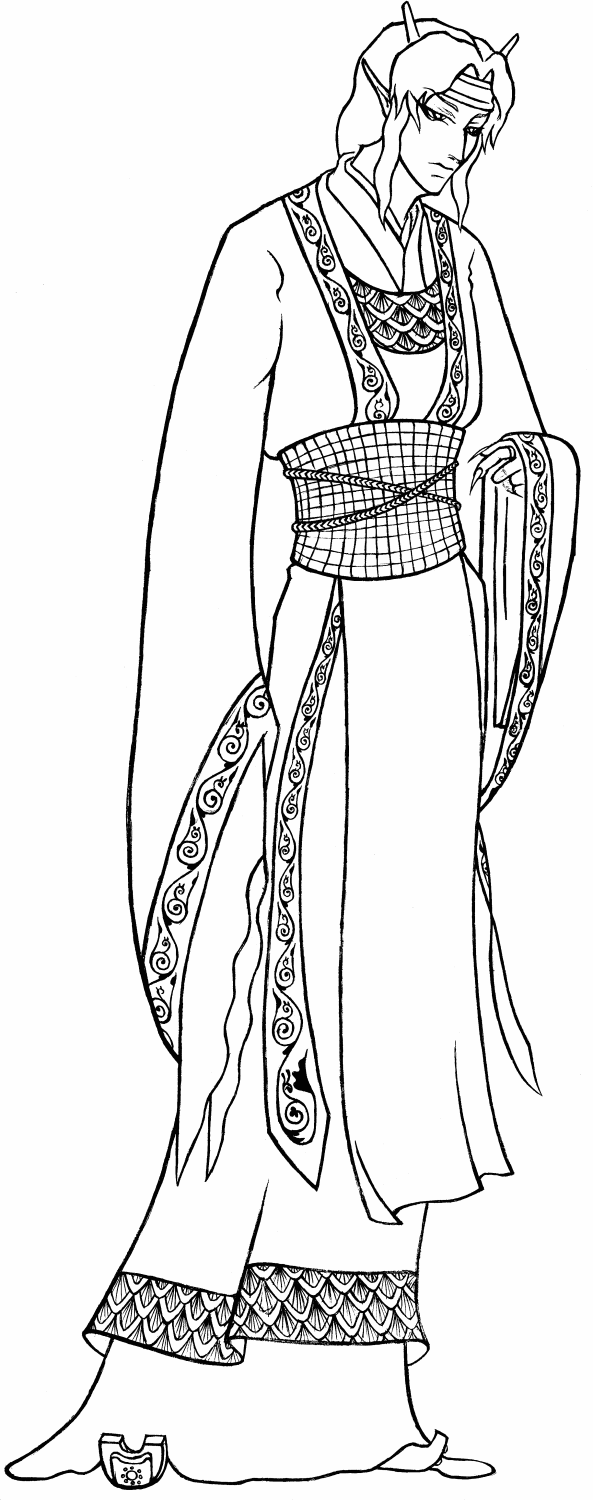 rasetsunyo. Linked from my archive because lj's gallery function reduces the size to something like half and you can't see it in proper detail.
His nose. I am so taken with his nose it's silly. Thank you again,
rasetsunyo! (I now discover the reason you never seem to update your lj is because I didn't friend you back even though I thought I had. That oversight has been taken care of.)I want to iconify the face but it seems you can't turn a .gip into a .jpeg in Photoshop even by turning it into a .bmp first, which is what I normally do. I know .gips can be icons but when you reduce it in size the clean lines go fuzzy. Anyone know a solution to this?
no subject
http://www.irfanview.com/main_download_engl.htm
It's nice for simple jobs such as rotate, changing color system (e.g., colors to black and white, why? yes), and of course, saving as one of many, many file types. And it's totally free.
Happy Yuletide!
no subject
no subject
no subject
I have the original scan, so I could send you just the face in either bitmap or jpeg?
no subject
no subject
no subject
no subject
no subject